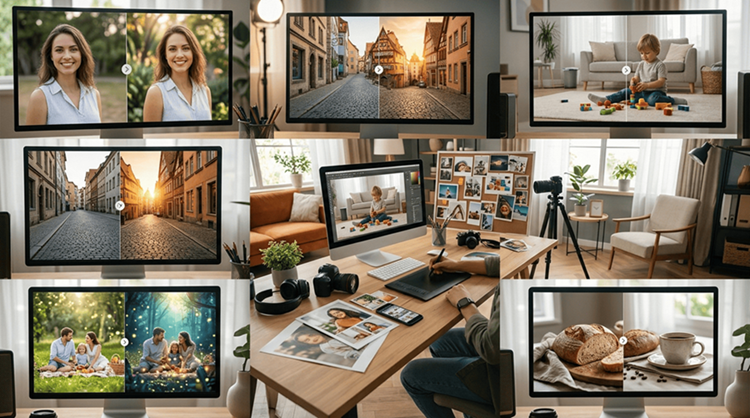
Everyday photos have a way of becoming some of our most meaningful memories. A quick family picture, a holiday snapshot, a photo from a weekend outing, or even an image of a favorite corner at home can become something worth keeping for years. Yet not every photo turns out exactly as we imagined.
Maybe the lighting is too dark, an unwanted person appears in the background, the composition feels unbalanced, or the image simply needs a little more polish. This is where an AI Image Editor can become a practical creative companion.
Instead of treating photo editing as a complicated task reserved for professional photographers, today’s tools make many adjustments easier to explore. With the right approach, an AI Image Editor helps you improve everyday pictures within Higgsfield supporting creative editing and visual refinement while still keeping the original feeling behind them.
For people who enjoy travel, family moments, home projects, or simply taking pictures for social media, AI assisted editing offers an accessible way to experiment with visual ideas.
Why Everyday Photos Often Need a Little Editing
Perfect pictures are not necessarily about the perfect camera. People, background noise, lighting, weather and timing can all impact the outcome.
A picture can be a great memory, but also have issues with the camera or photos. Perhaps you want to lighten a face, remove a distracting object, alter the frame or make the colors appear more in line with what you recall seeing.
These minor enhancements can be achieved with an AI Image Editor without needing to master all the nuances of traditional photo editors.
It doesn’t need to be a totally new picture. Often the biggest edits are those that make the original moment more enjoyable to experience.
1. Remove Unwanted Objects From Your Photos
One of the easiest ways to improve an everyday picture is to remove something distracting from the scene. Imagine taking a beautiful vacation photo only to notice a trash bin in the background. Perhaps a stranger walks through an otherwise perfect family picture, or a cable, sign, or small object distracts from the subject.
An AI Image Editor can make these situations easier to handle by identifying the unwanted area and filling it with a visually appropriate background.
This can be especially helpful for travel photography. Popular destinations are often crowded, and waiting for a completely empty scene is not always practical. Instead of abandoning the photograph, you can make a careful adjustment afterward.
The same approach works at home. If you photograph a newly decorated room, for example, removing a temporary item from a table or floor can make the image look cleaner.
The key is moderation. Removing a small distraction can strengthen a photograph, while removing too many elements may make the scene feel unnatural.
2. Improve Lighting and Color
The lighting can drastically alter the way that a picture appears. Photos taken in indoor lighting could appear darker than what you expect. The sunset photo may lose clarity in the background. Midday sunlight that is bright can make harsh shadows over faces.
The AI Image Editor will allow you to experiment with contrast, brightness, color balance, as well as other adjustments to your image without starting with scratch.
This is especially useful when taking family photos as natural moments can happen very quickly. It is not always possible to get everyone in ideal lighting prior to taking the shot. An AI photo editor will give you another chance to make the photo better after the time has gone by.
Color adjustments can make images appear more consistent while you’re making a collection of photos. If a number of photos from your trip have distinct tones, subtle editing can help to bring them together on a photo album or posted on social media. Instead of applying a slick filter try to make adjustments that keep the ambience of the photo’s original setting.
3. Turn Simple Photos Into Creative Memories
Not every photograph needs to remain completely realistic. Sometimes an ordinary picture can become more interesting when you experiment with the background, composition, or visual style. A family photo could become a playful creative image, while a picture from a special trip could be adapted for a personalized card or social post. An AI Image Editor gives you more room to test these ideas.
For example, you could create a cleaner background for a portrait, place a subject in a different visual environment, or explore a more artistic treatment while keeping the main subject recognizable.
This can be useful for people who enjoy documenting everyday life. Instead of letting older pictures remain hidden in a phone gallery, you can revisit them and discover new ways to present them. An ai picture editor can therefore be useful not only for fixing photographs but also for encouraging creativity.
Higgsfield provides an example of a broader AI creative workflow where visual tools are designed to help creators experiment with images and other forms of content in one environment. The important idea is to use such technology as a creative aid rather than letting the tool determine the entire result.
4. Prepare Better Photos for Social Media
Social platforms have made everyday photography more visible than ever. A casual breakfast, weekend trip, family celebration, or home project may become part of a personal feed. However, photographs often need different dimensions and compositions depending on where they will be shared. An AI Image Editor can help adapt a photograph for a particular format while keeping the main subject prominent.
For example, a landscape photograph may need to be reframed for a vertical post. A family group might need more space around the edges, while a close up portrait may benefit from a cleaner crop.
This is where an image editor ai workflow can save time. Instead of repeatedly rebuilding an image manually, you can experiment with different compositions and choose the version that works best.
You can also use editing to create simple cover images for travel stories, birthday posts, family announcements, or personal projects. The best social media edits still look natural. The purpose is to make the photograph easier to view, not to remove everything that makes it personal.
5. Bring New Life to Older Family Photos
Sentiment is a strong aspect of old photographs. May be faded colors, scratches, low contrast, and small imperfections due to age and scanning. The images may be from older phones or cameras and appear significantly different from today’s photos. An AI Image Editor can offer a solution to revisit these photos and experiment with subtle enhancements.
You may enhance a dark photo, make it clearer, eliminate a little bit of noise or make a cleaner version for printing. It can be particularly significant when creating family albums. A photographic album shouldn’t necessarily be the same from one decade to the next, but this doesn’t make the whole album less fun, if it is appropriately edited.
Higgsfield’s more of a creative tool is also a sign of how AI can open up avenues for experimentation with visual elements without needing to do it all by hand.
However, authenticity is important when it comes to restoring personal photos. Don’t do any changes that change key details or make a version of the past that didn’t happen.
Making AI Assisted Editing Feel Natural
The best AI editing begins with a definite goal. You should ask yourself if there is anything wrong with a photograph before editing it. Is the subject so dark that it is hard to see? Is there anything in the background that distracts? Is there a different crop that needs to be done on the image? Or is it just a creative variation you’re after? When you have the goal in mind, editing is so much easier.
While an AI Image Editor can offer suggestions or make edits, it’s essential to carefully review the output. Check face, hands, edges, reflections, background and other places that automated editing can generate unexpected information.
The original photograph is also a good idea to keep. Make a copy of the file before doing any major editing, so you can go back and check against the original. This is a straightforward thing to do, which will grant you greater flexibility to explore your options.
Choosing the Right Tool for Your Photos
Different editing platforms are designed for different needs. Some focus on quick corrections, while others provide more advanced generative capabilities.
When choosing an AI Image Editor, consider:
- How easy it is to use
- Whether it supports your preferred image formats
- Background and object editing capabilities
- Quality of generated changes
- Image export options
- Editing speed
- Privacy and data policies
- Commercial use terms
- Available free or paid features
A free ai photo editor can be enough for basic experimentation, particularly if you only need occasional corrections. For more frequent creative projects, a broader platform may provide additional controls and a smoother workflow.
Higgsfield is one example of a platform positioned around AI powered creative production. Its image tools can be considered when users want to explore more than basic photo corrections and experiment with generated visual concepts.
Practical Tips for Better Results
Even the best AI tools work better when the user provides clear direction. Start with a high quality source image whenever possible. A blurry or extremely compressed photograph gives the system less useful information to work with.
Be specific about the change you want. Instead of asking for a vague improvement, identify the subject and the intended adjustment.
For example:
“Remove the person in the background while keeping the building, lighting, and main subject unchanged.”
Specific instructions can make the desired result easier to understand. Review multiple versions when possible. The first result may be good, but another variation could preserve the original photograph more effectively.
Most importantly, remember that editing should support the story behind the image. Higgsfield can be useful as part of this broader creative experimentation, particularly when users want to explore different visual possibilities rather than simply make a basic correction.
What to Avoid When Editing Personal Photos
AI editing can be exciting, but there are situations where less is more. Avoid excessive smoothing that removes natural facial details. Be careful with edits to people, especially children, and avoid changing meaningful features simply because a tool suggests doing so.
You should also consider privacy before uploading personal photographs. Check how a platform stores and processes images, particularly when photographs contain family members or other identifiable people.
For important memories, keep an untouched original copy. The purpose of an AI Image Editor should be to give you more creative control, not to make every photograph look artificial.
How AI Can Make Everyday Creativity Easier
One of the most interesting benefits of AI assisted editing is accessibility. Someone who has never used professional photo software can now explore ideas that previously required specialized skills.
A parent can improve a family photograph. A traveler can clean up a destination picture. A homeowner can create a polished image of a newly decorated room. A hobby photographer can experiment with different visual styles.
Higgsfield AI creative suits form part of an ever growing set of devices that bring AI powered visual design closer to the everyday user. As the platforms continue to improve the process of creating images could change from mastering complex tools and much more focused on figuring out what you want your image to convey.
This shift in perspective can help photography become more accessible. Higgsfield illustrates how AI supported creative workflows are able to go beyond editing tasks and offer users an opportunity to play with the visual aspects.
Final Thoughts
Photographs taken every day do not have to be perfect in order to be important. Actually, their minor imperfections are often the personal aspect of them.
The benefit of using AI Image Editor is that it offers an additional method of working on those old memories. You can eliminate obstacles, increase lighting, alter composition, restore old photos or even experiment with a concept you’ve never thought of before.
When used in a thoughtful manner When used in a thoughtful manner, when used with care, an AI Image Editor can enhance the way that people already share and take photos. It doesn’t have to take over traditional photography or individual creativity.
Instead, it can provide a practical set of possibilities for turning ordinary images into photographs you are happier to keep, share, and revisit.
Higgsfield is one example of the growing range of AI powered creative platforms available to people who want to experiment with visual content while maintaining control over the creative direction.
Related Articles:
– How to Create High-Quality Digital Art Using AI Image Generators
– A Comprehensive Guide to Understanding Artificial Intelligence
– Adding a Human Touch: Narrations with AI Avatars in CapCut
– Virtual Thrills Await: Exploring Yas Island Top VR Experience
– 25 Best Travel Blogs in 2024: Top Travel Blogger Websites in the World
– Top 5 Travel Tips for a Stress-Free International Adventure: Your Guide to Smooth Travels